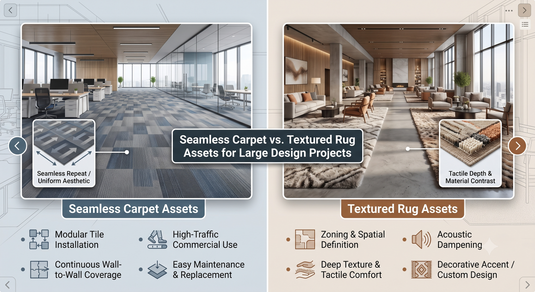
Seamless carpet textures and textured rug textures are not opposite categories. Seamless describes whether an image or procedural pattern can repeat without obvious joins. Textured describes the appearance of a surface, which may include woven detail, pile or relief. A textured carpet material can also be seamless.
For a large interior design project, use repeatable materials where a surface continues across a broad area, and a bounded rug representation where the object has a specific shape, pattern and edge. Then choose the level of physical detail according to camera distance and the purpose of the render.
This distinction helps avoid two common errors: repeating a complete rug like a floor tile, and expecting a flat image to reproduce the silhouette of a thick rug. The right approach is a combination of material, geometry, scale and project requirements.
Define the surface before choosing the texture
Start by asking what exists in the proposed design. Is it broadloom carpet, carpet tile, a large area rug or several separate rugs? These are different physical objects, even if their photographs show similar fibres.
A continuous carpet surface usually needs a material that can cover a large area without visible image boundaries. Carpet tile may need deliberate seams, directional variation or a layout pattern. A rug needs a defined outline and often an edge treatment.
Do not let a downloaded texture decide the product. Define the intended real material first, then choose or create an asset that represents it. A convincing render of the wrong construction can mislead the client as much as an obviously artificial render.
What seamless means in practice
A seamless image is designed so its opposite edges can meet when repeated. This removes an obvious join, but it does not guarantee that repetition will be invisible. A distinctive dark patch or bright feature can still appear at regular intervals across a large floor.
Test a texture over the actual project area. A sample that looks convincing on a small plane may reveal a grid when repeated many times. Look from the intended camera positions, including views that show a large proportion of the floor.
Procedural materials can also repeat or become visually uniform in an unconvincing way. The absence of image seams does not eliminate the need to assess scale and variation. Seamlessness solves one problem within a broader material workflow.
What a textured rug representation needs
A rug is a bounded object. Its design may include a border, asymmetry, fringe or a specific composition that should appear once across the whole surface. Repeating a complete rug photograph can duplicate those features and create an impossible object.
Use a full-design map where the pattern needs to stay in a fixed relationship to the rug outline. Add a separate fine surface layer for yarn detail when appropriate. That fine layer may be repeatable even though the overall rug design is unique.
Represent thickness and edges according to the view. A rug seen at an oblique angle may need geometry for its profile. A plan view may require less physical detail, but it still needs the correct outline and scale.
Compare the approaches for large projects
A repeatable carpet material is efficient when you need to cover a broad continuous floor. It can be reused across rooms and adjusted consistently. Its main risks are obvious repetition, wrong physical scale and an overly flat or noisy surface.
A complete rug asset gives more control over a specific design, border and silhouette. It is useful for a focal rug beneath a seating group. Its risks include stretched patterns, excessive texture size and geometry that becomes expensive without improving the final image.
For a project containing both carpet and rugs, use both approaches. Consistency does not require one technical method for every textile. It requires each asset to represent its intended object accurately and to share a coherent visual standard.
Establish real-world scale first
Use the project's actual dimensions for the rug and floor. Then decide how much physical area a texture tile represents. If the scale is arbitrary, fibres can appear as thick ropes or the pattern can look like miniature wallpaper.
Record that scale in the asset name or project notes. A team member should be able to reuse the material without guessing how it was intended to map. This is particularly useful when several rooms are developed by different people.
Compare the result with a physical sample or documented product image. A rug's motif and weave should be credible at the intended size. Our realistic carpet texture workflow provides a broader starting point for material preparation and testing.
Keep colour information separate from surface detail
An image showing colour is not automatically a reliable height map. Shadows in a photograph can be mistaken for physical relief. Highlights can also exaggerate the surface if they are interpreted as geometry.
Where your workflow uses separate maps, prepare colour, roughness and surface-detail information for their intended roles. Follow the software's documentation for image interpretation and colour management. Technical settings should be tied to the actual application and version in use.
Blender's Image Texture documentation describes image extension options, including repeat behaviour. The node context matters: a geometry-node image texture is not interchangeable with every shader workflow. Use the documentation for your specific node setup.
Use bump detail for the right purpose
Bump mapping changes the apparent surface normal used for shading. It can create the impression of fine relief without changing the object's actual outline. This is useful for small surface detail, but it cannot create a thick rug edge by itself.
Blender's Bump Node manual explains the relevant inputs and behaviour for that version. If your project uses another version or renderer, check its equivalent documentation rather than assuming all controls work identically.
Keep the effect proportionate. Too much bump can make a textile look rocky or artificially crunchy. Review the material under more than one light direction. A convincing result should remain plausible rather than depending on one carefully chosen highlight.
Add geometry only when the view needs it
Actual displacement or fibre geometry can improve close views, silhouettes and shadows. It can also increase memory use and render cost. More detail is not automatically a better project if the final camera cannot see it.
Use a simple edge profile for a distant rug and reserve finer detail for hero views where it contributes visibly. Consider separate levels of detail for different shots. A large project may contain many rugs, but only a few may need close scrutiny.
Do not use geometry to compensate for an incorrect material scale. A dense fibre simulation with the wrong proportions can still look unconvincing. Establish shape, scale and general shading before adding the most expensive surface detail.
Control repetition without inventing the product
Subtle variation can reduce the visible grid of a seamless texture. However, random rotation or colour changes may misrepresent a directional carpet or a specified product. Any variation should remain compatible with the material being proposed.
For carpet tile, orientation may be part of the installation design. Show the intended layout rather than randomising tiles for convenience. For a continuous carpet, avoid artificial seams unless the installation plan actually includes them.
For a rug, preserve the intended pattern. You can use a repeating fine yarn layer while keeping the large design fixed. This separates surface realism from decorative composition and avoids turning a single rug into a collection of repeated motifs.
Lighting is part of the material test
A textile can look flat under one light and excessively shiny under another. Test the material in a simple lighting setup before placing it in a complicated room. Then evaluate it under the lighting proposed for the project.
Check grazing light, which can reveal surface relief and repetition. Look at both bright and shaded areas. Do not judge the material only through a heavily processed final image that may hide errors or exaggerate contrast.
Lustrous real fibres can show directional appearance changes, but a render should not imply a finish the actual rug does not have. Use a sample or supplier reference where possible. Wool rugs and bamboo-silk rugs provide different visual references, and each product's actual composition still needs verification.
Build a manageable asset library
Store a preview, dimensions, mapping scale, source and licence with each asset. Include the software or renderer setup if the material depends on particular nodes. A texture file without context can be difficult to reuse correctly.
Name files clearly enough to distinguish the full rug design from repeatable fine detail. Keep revisions organised so the team does not accidentally return to an outdated colour or size. A lightweight preview can help identify assets without loading every high-resolution file.
Consider the resolution required by the final view. Oversized files can slow work without adding visible information. Under-resolution can blur a pattern in a close shot. Choose resolution according to projected screen coverage rather than a fixed rule that every map must be extremely large.
Check rights before using an image
A photograph found on Pinterest or a retailer's website is not automatically licensed for commercial asset creation. Confirm permission and usage terms. Keep a record of the source and the rights that apply to the project.
If you photograph a sample, control the lighting and perspective so the image is useful for its intended purpose. Avoid baking strong shadows into a colour map. If a supplier provides approved texture assets, check whether they represent the exact product and whether modification is permitted.
Do not present an unrelated stock texture as an exact product simulation. Label a render as indicative where appropriate and explain which choices still require approval. Accuracy about the source is part of professional project communication.
Connect the render with the purchasing brief
A visually convincing asset does not establish the durability, cleaning requirements or availability of a real rug. Keep the material schedule separate and include the selected product's composition, construction and dimensions.
For a custom rug, confirm how the design changes when the dimensions change. A render can stretch a pattern instantly, while a supplier may need to redraw it or change a border. Our custom-size rug comparison explains how to record approvals and production stages.
Explore textured rugs for design references and large-size rugs for proportional ideas. These are physical products to assess, not automatically downloadable or licensed digital textures.
A practical review sequence
Review the object type and dimensions first. Then check mapping scale, pattern placement and edges. Next inspect the fine surface under simple lighting. Only after those decisions are sound should you increase geometry or render complexity.
Test at least one wide room view and one closer view relevant to the presentation. Look for repetition, stretching, unrealistic shine and a rug that appears to float above the floor. Fix the underlying cause rather than hiding it with camera framing.
Record the approved setup so later changes can be made consistently. If the client changes the rug size or fibre, revisit the asset rather than assuming the old shading remains accurate. A disciplined sequence makes large projects easier to maintain.
Related rug planning guides
For the physical design behind the render, review 2026 carpet inspiration, minimalist wall rug ideas and Italian rug specifications. Keep visual references separate from verified product data when presenting the final proposal.
Frequently asked questions
Can a textured rug material be seamless?
Yes. A repeatable fine surface can represent texture while a separate map preserves the rug's overall design. Seamless and textured describe different properties. Decide which elements should repeat and which should remain unique.
Is a seamless texture enough for a close-up rug render?
It may be enough for some surface shading, but close views can also need thickness, edges and additional relief. Choose detail according to the camera and the intended product. A flat plane cannot reproduce every physical feature through an image alone.
Should I use the same rug asset throughout a large project?
Reuse can improve consistency and efficiency where the specification is genuinely the same. Do not duplicate a complete decorative rug across unrelated areas merely because the asset is available. The design brief should determine where it belongs.
What is the main difference to remember?
Repeatable carpet textures describe continuous surfaces efficiently. Bounded rug assets preserve a particular object's outline and decorative composition. Realistic projects use the appropriate combination, with correct scale and product information supporting the visual result.